

使用React Router创建原生应用般的Web应用
想用Web技术制作应用程序吗?
你知道吗?可以使用Web技术制作应用程序。用React Router创建Web应用,然后用Expo或Flutter的WebView包装,就可以直接发布到应用商店。
但是Web应用有一个最大的弱点。那就是页面过渡很生硬。
原生应用的屏幕过渡非常自然。从列表进入详情时会滑动,点击图片时会放大并打开。但是Web呢?页面只是生硬地切换。
如果Web也能实现原生般的页面过渡呢? 那样的Web应用会让人感觉像真正的应用程序。
今天我们将使用React Router创建一个具有原生应用般页面过渡效果的Web应用。
什么是SSGOI?
SSGOI(쓱오이)是一个在所有浏览器中都能运行的页面过渡库。
虽然Chrome有View Transition API,但它在Safari和Firefox中无法运行。SSGOI解决了这个问题。
SSGOI的优势:
- 支持所有现代浏览器(Chrome、Firefox、Safari、Edge)
- 完美兼容SSR/SSG
- 基于弹簧的物理动画,实现自然流畅的运动
- 多种内置过渡效果(Drill、Slide、Pinterest、Instagram等)
开始使用
让我们从SSGOI官方模板开始。
# 克隆仓库
git clone https://github.com/meursyphus/ssgoi

# 在根目录安装依赖(重要!)
pnpm install

# 进入React Router模板文件夹
cd templates/react-router

# 运行开发服务器
pnpm run dev
注意:
pnpm install必须在根路径执行。因为是monorepo结构,需要在根目录安装所有依赖。
在浏览器中打开http://localhost:5173即可查看模板演示。
了解文件夹结构
templates/react-router/的文件夹结构如下。
templates/react-router/
├── app/
│   ├── root.tsx                # 根布局
│   ├── routes.ts               # 路由定义
│   ├── routes/                 # 页面路由
│   │   ├── home.tsx
│   │   ├── posts.tsx           # Drill过渡示例
│   │   ├── posts.$postId.tsx
│   │   ├── pinterest.tsx       # Pinterest过渡示例
│   │   ├── pinterest.$pinId.tsx
│   │   ├── profile.tsx         # Instagram过渡示例
│   │   ├── profile.$postId.tsx
│   │   ├── products.tsx
│   │   ├── products_.layout.tsx # Slide过渡示例
│   │   └── products_*.tsx
│   └── components/
│       ├── demo-layout.tsx     # Ssgoi配置(核心!)
│       ├── demo-wrapper.tsx    # 移动端框架UI
│       ├── posts/
│       ├── pinterest/
│       ├── profile/
│       └── products/
核心文件是demo-layout.tsx。所有过渡配置都在这里。
配置Ssgoi
打开app/components/demo-layout.tsx。
import React, { useMemo } from "react";
import { Link, useLocation } from "react-router";
import { Ssgoi } from "@ssgoi/react";
import {
  drill,
  pinterest,
  instagram,
} from "@ssgoi/react/view-transitions";

export default function DemoLayout({ children }: { children: React.ReactNode }) {
  const location = useLocation();
  const pathname = location.pathname;

  const config = useMemo(
    () => ({
      transitions: [
        // Pinterest过渡
        {
          from: "/pinterest/*",
          to: "/pinterest",
          transition: pinterest(),
          symmetric: true,
        },
        // Posts - Drill过渡
        {
          from: "/posts",
          to: "/posts/*",
          transition: drill({ direction: "enter" }),
        },
        {
          from: "/posts/*",
          to: "/posts",
          transition: drill({ direction: "exit" }),
        },
        // Profile - Instagram过渡
        {
          from: "/profile",
          to: "/profile/*",
          transition: instagram(),
          symmetric: true,
        },
      ],
    }),
    [],
  );

  return (
    <div className="h-full bg-[#121212] flex z-0">
      <div className="w-full bg-[#121212] flex flex-col overflow-hidden relative">
        <main className="flex-1 w-full overflow-y-scroll overflow-x-hidden relative z-0 bg-[#121212]">
          <Ssgoi config={config}>{children}</Ssgoi>
        </main>
        {/* 导航栏 */}
      </div>
    </div>
  );
}
config配置:
from: 起始路径(*表示通配符)to: 目标路径transition: 要使用的过渡效果symmetric: 反向也应用相同的过渡效果
用SsgoiTransition包装页面
每个页面都需要用SsgoiTransition包装,并赋予唯一的id。
查看app/components/posts/index.tsx:
import { SsgoiTransition } from "@ssgoi/react";
import { Link } from "react-router";

export default function PostsDemo() {
  return (
    <SsgoiTransition id="/posts">
      <div className="min-h-full bg-[#121212] px-4 py-6">
        {/* 文章列表 */}
      </div>
    </SsgoiTransition>
  );
}
查看app/components/posts/detail.tsx:
export default function PostDetail({ postId }: { postId: string }) {
  return (
    <SsgoiTransition id={`/posts/${postId}`}>
      <div className="min-h-screen bg-[#121212]">{/* 文章详情 */}</div>
    </SsgoiTransition>
  );
}
核心:
id必须与config中的from/to匹配,SSGOI才能应用过渡效果。
Drill过渡
从列表进入详情的过渡效果。
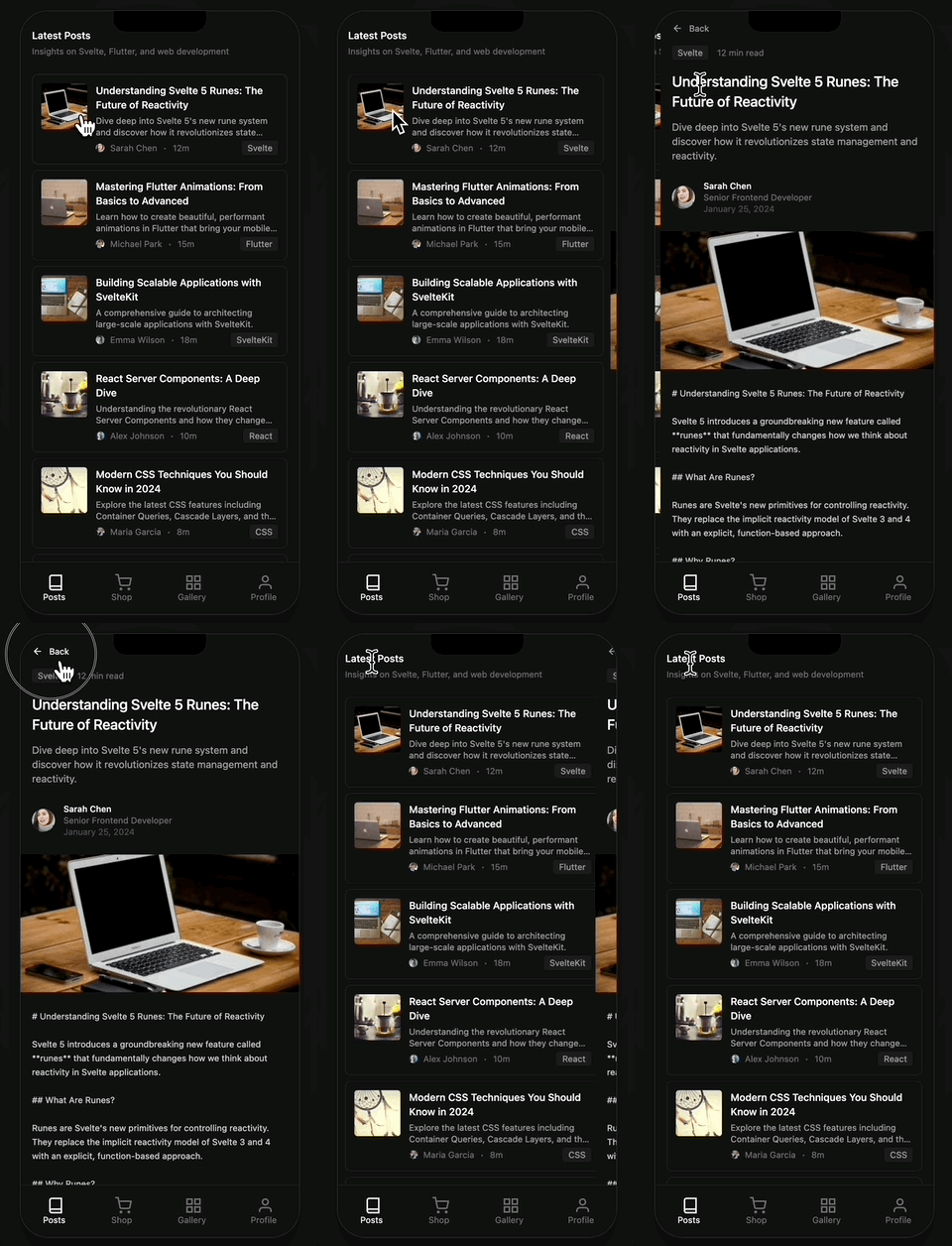
模板位置: app/components/posts/
import { drill } from "@ssgoi/react/view-transitions";

// 列表 → 详情(进入时)
drill({ direction: "enter" });

// 详情 → 列表(退出时)
drill({ direction: "exit" });
config配置:
{
  from: "/posts",
  to: "/posts/*",
  transition: drill({ direction: "enter" }),
},
{
  from: "/posts/*",
  to: "/posts",
  transition: drill({ direction: "exit" }),
},
选项:
direction:"enter"|"exit"opacity: 设为true时添加淡入淡出效果
Slide过渡
在选项卡UI中左右滑动的效果。

模板位置: app/routes/products_.layout.tsx
import { slide } from "@ssgoi/react/view-transitions";

// 向左滑动
slide({ direction: "left" });

// 向右滑动
slide({ direction: "right" });
在products_.layout.tsx中使用嵌套的Ssgoi来仅对选项卡区域应用过渡:
import { Outlet, useLocation } from "react-router";
import { Ssgoi, SsgoiTransition } from "@ssgoi/react";
import { slide } from "@ssgoi/react/view-transitions";

export default function ProductsLayout() {
  const location = useLocation();
  const pathname = location.pathname;

  const config = useMemo(
    () => ({
      transitions: [
        {
          from: "/products/tab/left",
          to: "/products/tab/right",
          transition: slide({ direction: "left" }),
        },
        {
          from: "/products/tab/right",
          to: "/products/tab/left",
          transition: slide({ direction: "right" }),
        },
      ],
      middleware: (from: string, to: string) => {
        const fromIndex = categories.findIndex((c) => c.path === from);
        const toIndex = categories.findIndex((c) => c.path === to);

        if (fromIndex !== -1 && toIndex !== -1 && fromIndex !== toIndex) {
          if (fromIndex < toIndex) {
            return { from: "/products/tab/left", to: "/products/tab/right" };
          } else {
            return { from: "/products/tab/right", to: "/products/tab/left" };
          }
        }

        return { from, to };
      },
    }),
    [],
  );

  return (
    <SsgoiTransition id="/products">
      {/* 头部、选项卡按钮 */}
      <div className="flex-1 overflow-hidden">
        <Ssgoi config={config}>
          <Outlet />
        </Ssgoi>
      </div>
    </SsgoiTransition>
  );
}
Pinterest过渡
画廊图片放大并过渡到详情的效果。
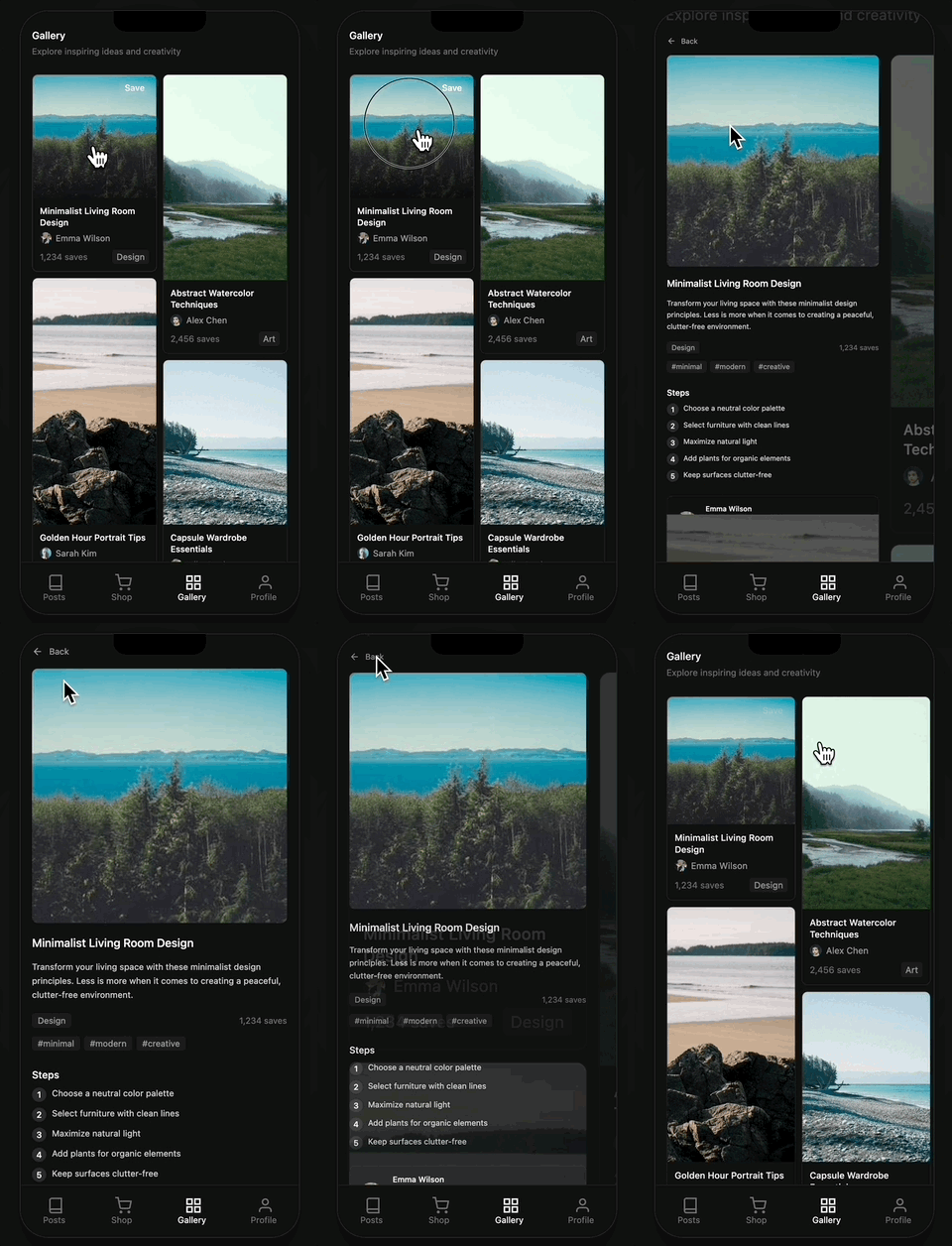
模板位置: app/components/pinterest/
设置Data属性(必需!)
Pinterest过渡需要通过data属性来指定哪些图片之间建立连接。
app/components/pinterest/index.tsx(画廊):
function PinCard({ item }: { item: PinterestItem }) {
  return (
    <Link to={`/pinterest/${item.id}`}>
      <div className="relative" style={{ aspectRatio: item.aspectRatio }}>
        <img
          src={item.image}
          alt={item.title}
          className="w-full h-full object-cover"
          data-pinterest-gallery-key={item.id}
        />
      </div>
    </Link>
  );
}
app/components/pinterest/detail.tsx(详情):
export default function PinterestDetail({ pinId }: { pinId: string }) {
  const item = getPinterestItem(pinId);

  return (
    <SsgoiTransition id={`/pinterest/${pinId}`}>
      <img
        src={item.image}
        alt={item.title}
        style={{ aspectRatio: item.aspectRatio }}
        data-pinterest-detail-key={item.id}
      />
    </SsgoiTransition>
  );
}
核心:
data-pinterest-gallery-key和data-pinterest-detail-key必须使用相同的id,SSGOI才能识别连接关系。
config配置:
{
  from: "/pinterest/*",
  to: "/pinterest",
  transition: pinterest(),
  symmetric: true,
}
Instagram过渡
从个人资料feed网格过渡到详情的效果。与Pinterest类似,但画廊保持不变。

模板位置: app/components/profile/
设置Data属性
app/components/profile/feed.tsx(网格):
function PostCard({ post }: { post: Post }) {
  return (
    <Link to={`/profile/${post.id}`}>
      <img
        src={post.coverImage.url}
        alt={post.title}
        className="w-full h-auto object-cover"
        data-instagram-gallery-key={post.id}
      />
    </Link>
  );
}
app/components/profile/feed-detail.tsx(详情):
export default function FeedDetail({ postId }: { postId: string }) {
  const post = getPost(postId);

  return (
    <SsgoiTransition id={`/profile/${postId}`}>
      <img
        src={post.coverImage.url}
        alt={post.title}
        data-instagram-detail-key={post.id}
      />
    </SsgoiTransition>
  );
}
config配置:
{
  from: "/profile",
  to: "/profile/*",
  transition: instagram(),
  symmetric: true,
}
使用Spring选项调整时序
所有过渡都使用基于弹簧的物理动画。可以通过spring选项来调整速度和感觉。
drill({
  direction: "enter",
  spring: {
    stiffness: 200, // 越高越快
    damping: 20, // 越高越少弹跳
    doubleSpring: true, // 开启ease-in-out效果
  },
});
Spring选项说明
| 选项 | 说明 | 效果 |
|---|---|---|
stiffness | 刚度 | 越高越快且反应更快 |
damping | 阻尼 | 越高弹跳越少且更平滑 |
doubleSpring | 双重弹簧 | true/false - ease-in-out效果 |
什么是doubleSpring? 类似CSS的ease-in-out,开始和结束都很平滑的效果。详细内容请参考Double Spring博客文章。
实用选项
symmetric选项
自动设置双向过渡。
// 只需设置这一个
{
  from: "/pinterest/*",
  to: "/pinterest",
  transition: pinterest(),
  symmetric: true,
}

// 反向也会自动应用
通配符路由
使用*匹配所有子路径。
// 匹配/posts/1、/posts/abc等
{ from: "/posts", to: "/posts/*", ... }
总结
现在你也可以在React Router Web应用中应用原生般的页面过渡效果了!
资源
- GitHub: https://github.com/meursyphus/ssgoi
- 官方文档: https://ssgoi.dev
- React Router模板: https://github.com/meursyphus/ssgoi/tree/main/templates/react-router
用WebView包装它,制作成真正的应用程序吧!