

Tanstack Router로 네이티브 앱 같은 웹앱 만들기
Tanstack Router + SSGOI
Tanstack Router는 타입 안전성과 파일 기반 라우팅으로 인기를 얻고 있는 React 라우터입니다. 이 튜토리얼에서는 Tanstack Router와 SSGOI를 함께 사용해 네이티브 앱 같은 페이지 트랜지션을 구현하는 방법을 알아봅니다.
React Router 사용자라면 React Router 튜토리얼을 참고하세요.
시작하기
SSGOI 공식 템플릿으로 시작해봅시다.
# 레포지토리 클론
git clone https://github.com/meursyphus/ssgoi

# 루트에서 의존성 설치 (중요!)
pnpm install

# Tanstack Router 템플릿 폴더로 이동
cd templates/tanstack-router

# 개발 서버 실행
pnpm run dev
주의:
pnpm install은 반드시 루트 경로에서 실행해야 합니다. 모노레포 구조라서 루트에서 전체 의존성을 설치합니다.
브라우저에서 http://localhost:5173을 열면 템플릿 데모를 확인할 수 있습니다.
폴더 구조 살펴보기
templates/tanstack-router/ 폴더 구조입니다.
templates/tanstack-router/
├── app/
│   ├── main.tsx               # 앱 진입점
│   ├── routeTree.gen.ts       # 자동 생성된 라우트 트리
│   ├── routes/                # 페이지 라우트
│   │   ├── __root.tsx         # 루트 레이아웃
│   │   ├── index.tsx          # 홈 (리다이렉트)
│   │   ├── posts.tsx          # Posts 레이아웃
│   │   ├── posts.index.tsx    # Posts 목록
│   │   ├── posts.$postId.tsx  # Posts 상세
│   │   ├── pinterest.tsx      # Pinterest 레이아웃
│   │   ├── pinterest.index.tsx
│   │   ├── pinterest.$pinId.tsx
│   │   ├── products.tsx       # Products 레이아웃 (중첩 Ssgoi)
│   │   ├── products.index.tsx
│   │   └── products.*.tsx     # 카테고리별 라우트
│   └── components/
│       ├── demo-layout.tsx    # Ssgoi 설정 (핵심!)
│       ├── posts/
│       ├── pinterest/
│       ├── profile/
│       └── products/
핵심 파일은 demo-layout.tsx입니다. 모든 트랜지션 설정이 여기에 있습니다.
React Router와의 차이점
Tanstack Router를 사용할 때 알아야 할 핵심 차이점들입니다.
1. 파일 네이밍 규칙
React Router에서는 $가 동적 세그먼트를 의미하고, 파일들이 형제 관계입니다.
routes/
├── posts.tsx           # /posts
└── posts.$postId.tsx   # /posts/:postId (형제)
Tanstack Router에서는 .이 부모-자식 관계를 만듭니다.
routes/
├── posts.tsx           # /posts 레이아웃 (부모)
├── posts.index.tsx     # /posts (인덱스)
└── posts.$postId.tsx   # /posts/:postId (자식)
핵심: Tanstack Router에서
posts.$postId.tsx는posts.tsx의 자식입니다. 부모인posts.tsx에<Outlet />이 없으면 자식이 렌더링되지 않습니다!
2. Location 훅
// React Router
import { useLocation } from "react-router";
const location = useLocation();
const pathname = location.pathname;

// Tanstack Router
import { useRouterState } from "@tanstack/react-router";
const location = useRouterState({ select: (s) => s.location });
const pathname = location.pathname;
3. Link 컴포넌트
// React Router
import { Link } from "react-router";
<Link to={`/posts/${postId}`}>

// Tanstack Router
import { Link } from "@tanstack/react-router";
<Link to={`/posts/${postId}`}>  // 동일!
Ssgoi 설정하기
app/components/demo-layout.tsx를 열어보세요.
import { useMemo, useRef, useEffect } from "react";
import { Link, Outlet, useRouterState } from "@tanstack/react-router";
import { Ssgoi } from "@ssgoi/react";
import {
  drill,
  pinterest,
  instagram,
} from "@ssgoi/react/view-transitions";

export default function DemoLayout({ children }: { children: React.ReactNode }) {
  const location = useRouterState({ select: (s) => s.location });
  const pathname = location.pathname;

  const config = useMemo(
    () => ({
      transitions: [
        // Pinterest 트랜지션
        {
          from: "/pinterest/*",
          to: "/pinterest",
          transition: pinterest(),
          symmetric: true,
        },
        // Posts - Drill 트랜지션
        {
          from: "/posts",
          to: "/posts/*",
          transition: drill({ direction: "enter" }),
        },
        {
          from: "/posts/*",
          to: "/posts",
          transition: drill({ direction: "exit" }),
        },
        // Profile - Instagram 트랜지션
        {
          from: "/profile",
          to: "/profile/*",
          transition: instagram(),
          symmetric: true,
        },
      ],
    }),
    [],
  );

  return (
    <div className="h-full bg-[#121212] flex z-0">
      <div className="w-full bg-[#121212] flex flex-col overflow-hidden relative">
        <main className="flex-1 w-full overflow-y-scroll overflow-x-hidden relative z-0 bg-[#121212]">
          <Ssgoi config={config}>{children}</Ssgoi>
        </main>
        {/* 네비게이션 바 */}
      </div>
    </div>
  );
}
레이아웃 파일 패턴 (중요!)
Tanstack Router에서 SSGOI를 사용할 때 가장 중요한 패턴입니다.
문제 상황
URL은 변경되는데 페이지가 안 바뀌는 경우가 있습니다. 이는 Tanstack Router의 파일 기반 라우팅 특성 때문입니다.
해결: 레이아웃 파일 생성
각 섹션마다 <Outlet />을 렌더링하는 레이아웃 파일이 필요합니다.
app/routes/posts.tsx:
import { createFileRoute, Outlet } from "@tanstack/react-router";

export const Route = createFileRoute("/posts")({
  component: () => <Outlet />,
});
app/routes/posts.index.tsx (목록 페이지):
import { createFileRoute } from "@tanstack/react-router";
import PostsDemo from "../components/posts";

export const Route = createFileRoute("/posts/")({
  component: PostsDemo,
});
app/routes/posts.$postId.tsx (상세 페이지):
import { createFileRoute } from "@tanstack/react-router";
import PostDetail from "../components/posts/detail";

export const Route = createFileRoute("/posts/$postId")({
  component: () => {
    const { postId } = Route.useParams();
    return <PostDetail postId={postId} />;
  },
});
스크롤 위치 복원
뒤로가기 시 스크롤 위치를 복원하는 것은 네이티브 앱 경험에 필수입니다.
문제 상황
useLayoutEffect를 사용하면 스크롤이 제대로 복원되지 않습니다. 저장된 위치가 2587px인데 실제로는 476px만 적용되는 현상이 발생합니다.
원인
Tanstack Router의 중첩 라우트 구조에서 useLayoutEffect는 <Outlet /> 내부 콘텐츠가 렌더링되기 전에 실행됩니다. 이 시점에는 스크롤 가능한 높이가 부족해서 원하는 위치까지 스크롤할 수 없습니다.
해결: requestAnimationFrame 재시도
const scrollPositions = useRef<Record<string, number>>({});

// 스크롤 위치 저장
useEffect(() => {
  if (!mainRef.current) return;

  const handleScroll = () => {
    if (!mainRef.current) return;
    scrollPositions.current[pathname] = mainRef.current.scrollTop;
  };

  const element = mainRef.current;
  element.addEventListener("scroll", handleScroll);
  return () => element?.removeEventListener("scroll", handleScroll);
}, []);

// 스크롤 위치 복원
useEffect(() => {
  if (!mainRef.current) return;
  const savedPosition = scrollPositions.current[pathname] || 0;

  const restoreScroll = () => {
    if (!mainRef.current) return;
    mainRef.current.scrollTop = savedPosition;

    // 목표에 도달하지 못했으면 재시도
    if (mainRef.current.scrollTop !== savedPosition && savedPosition > 0) {
      requestAnimationFrame(restoreScroll);
    }
  };

  requestAnimationFrame(restoreScroll);
}, [pathname]);
핵심:
useLayoutEffect대신useEffect를 사용하고,requestAnimationFrame으로 콘텐츠가 렌더링될 때까지 재시도합니다.
중첩 Ssgoi (탭 트랜지션)
Shop 페이지처럼 탭 UI에서 슬라이드 트랜지션을 적용하려면 중첩된 Ssgoi를 사용합니다.
app/routes/products.tsx:
import { useMemo } from "react";
import { createFileRoute, Link, Outlet, useRouterState } from "@tanstack/react-router";
import { Ssgoi, SsgoiTransition } from "@ssgoi/react";
import { slide } from "@ssgoi/react/view-transitions";

const categories = [
  { id: "all", label: "All", path: "/products/all" },
  { id: "electronics", label: "Tech", path: "/products/electronics" },
  { id: "fashion", label: "Fashion", path: "/products/fashion" },
  { id: "home", label: "Home", path: "/products/home" },
  { id: "beauty", label: "Beauty", path: "/products/beauty" },
];

function ProductsLayout() {
  const location = useRouterState({ select: (s) => s.location });
  const pathname = location.pathname;

  const config = useMemo(
    () => ({
      transitions: [
        {
          from: "/products/tab/left",
          to: "/products/tab/right",
          transition: slide({ direction: "left" }),
        },
        {
          from: "/products/tab/right",
          to: "/products/tab/left",
          transition: slide({ direction: "right" }),
        },
      ],
      middleware: (from: string, to: string) => {
        const fromIndex = categories.findIndex((c) => c.path === from);
        const toIndex = categories.findIndex((c) => c.path === to);

        if (fromIndex !== -1 && toIndex !== -1 && fromIndex !== toIndex) {
          if (fromIndex < toIndex) {
            return { from: "/products/tab/left", to: "/products/tab/right" };
          } else {
            return { from: "/products/tab/right", to: "/products/tab/left" };
          }
        }

        return { from, to };
      },
    }),
    [],
  );

  return (
    <SsgoiTransition id="/products" className="min-h-screen bg-[#121212] flex flex-col">
      {/* 헤더 */}
      <div className="px-4 pt-6 pb-3">
        <h1 className="text-sm font-medium text-white mb-1">Shop</h1>
      </div>

      {/* 카테고리 탭 */}
      <div className="px-4 mb-4">
        <div className="flex gap-2 overflow-x-auto">
          {categories.map((cat) => (
            <Link
              key={cat.id}
              to={cat.path}
              className={`px-4 py-2 rounded-full text-xs font-medium ${
                pathname === cat.path
                  ? "bg-white text-black"
                  : "bg-white/10 text-neutral-400"
              }`}
            >
              {cat.label}
            </Link>
          ))}
        </div>
      </div>

      {/* 탭 콘텐츠 - 여기서 슬라이드 트랜지션 */}
      <div className="flex-1 overflow-hidden">
        <Ssgoi config={config}>
          <Outlet />
        </Ssgoi>
      </div>
    </SsgoiTransition>
  );
}

export const Route = createFileRoute("/products")({
  component: ProductsLayout,
});
트랜지션 종류
Drill 트랜지션
리스트에서 상세로 들어가는 느낌입니다.
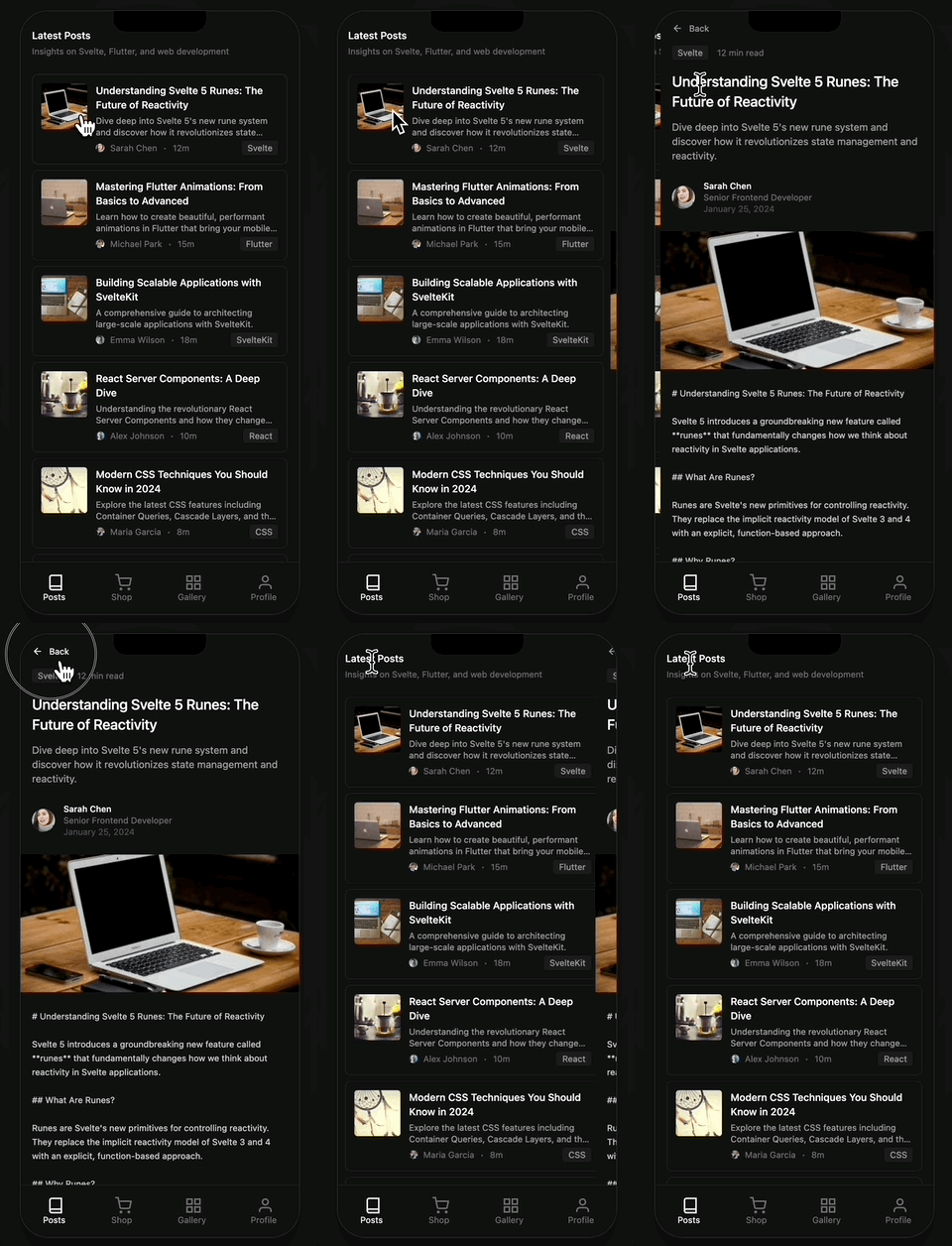
import { drill } from "@ssgoi/react/view-transitions";

drill({ direction: "enter" });  // 들어갈 때
drill({ direction: "exit" });   // 나올 때
Pinterest 트랜지션
이미지가 확대되면서 상세로 전환됩니다.
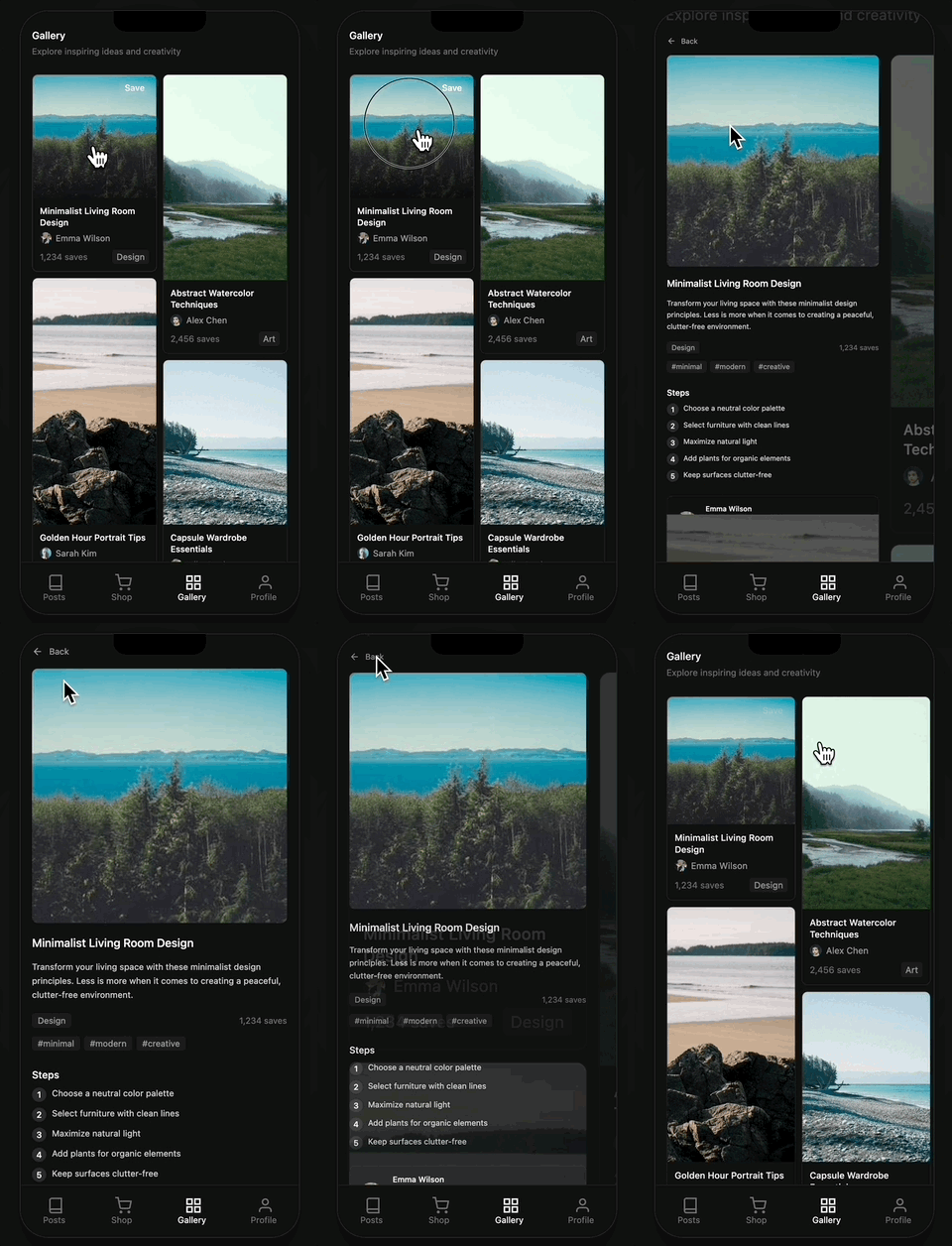
import { pinterest } from "@ssgoi/react/view-transitions";

// data 어트리뷰트 필수!
<img data-pinterest-gallery-key={item.id} />  // 갤러리
<img data-pinterest-detail-key={item.id} />   // 상세
Instagram 트랜지션
그리드에서 상세로, 갤러리가 유지됩니다.
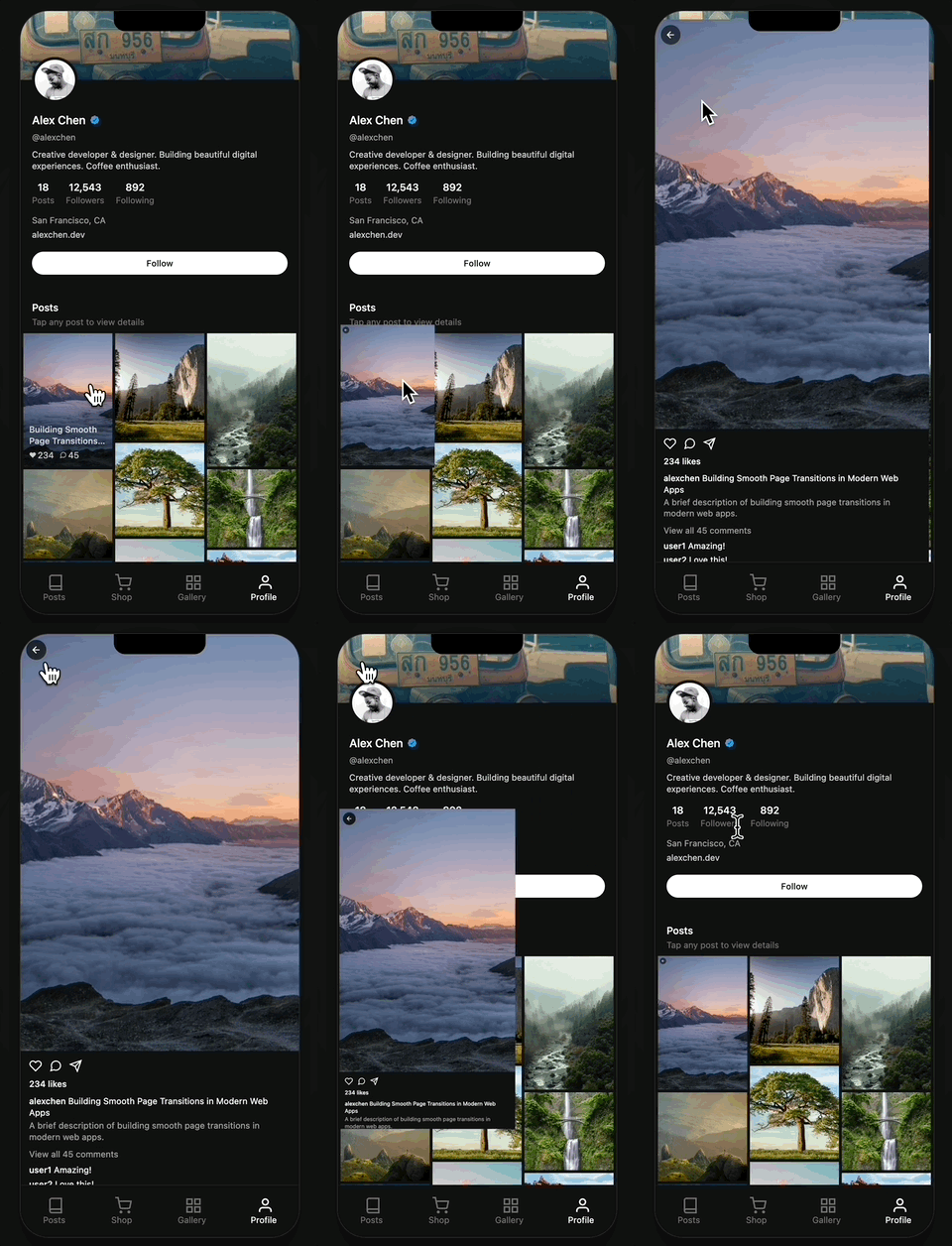
import { instagram } from "@ssgoi/react/view-transitions";

<img data-instagram-gallery-key={post.id} />  // 그리드
<img data-instagram-detail-key={post.id} />   // 상세
Slide 트랜지션
탭 전환 시 좌우 슬라이드입니다.

import { slide } from "@ssgoi/react/view-transitions";

slide({ direction: "left" });
slide({ direction: "right" });
마무리
Tanstack Router와 SSGOI를 함께 사용하면 타입 안전한 라우팅과 네이티브 같은 트랜지션을 모두 얻을 수 있습니다.
핵심 포인트 정리
- 레이아웃 파일 필수: 각 섹션마다
<Outlet />을 렌더링하는 레이아웃 파일 생성 - 스크롤 복원:
useEffect+requestAnimationFrame재시도 패턴 사용 - 중첩 Ssgoi: 탭 UI에서는 부모 레이아웃에 별도 Ssgoi 설정
리소스
- GitHub: https://github.com/meursyphus/ssgoi
- 공식 문서: https://ssgoi.dev
- Tanstack Router 템플릿: https://github.com/meursyphus/ssgoi/tree/main/templates/tanstack-router