

Building Native-Like Web Apps with Tanstack Router
Tanstack Router + SSGOI
Tanstack Router is gaining popularity for its type safety and file-based routing. This tutorial shows you how to implement native-like page transitions using Tanstack Router with SSGOI.
If you're using React Router, check out the React Router tutorial.
Getting Started
Let's start with the official SSGOI template.
# Clone the repository
git clone https://github.com/meursyphus/ssgoi

# Install dependencies at root (important!)
pnpm install

# Navigate to the Tanstack Router template
cd templates/tanstack-router

# Start the dev server
pnpm run dev
Note: Run
pnpm installat the root directory. This is a monorepo, so dependencies are installed from the root.
Open http://localhost:5173 in your browser to see the template demo.
Folder Structure
Here's the templates/tanstack-router/ structure:
templates/tanstack-router/
├── app/
│   ├── main.tsx               # App entry point
│   ├── routeTree.gen.ts       # Auto-generated route tree
│   ├── routes/                # Page routes
│   │   ├── __root.tsx         # Root layout
│   │   ├── index.tsx          # Home (redirect)
│   │   ├── posts.tsx          # Posts layout
│   │   ├── posts.index.tsx    # Posts list
│   │   ├── posts.$postId.tsx  # Posts detail
│   │   ├── pinterest.tsx      # Pinterest layout
│   │   ├── pinterest.index.tsx
│   │   ├── pinterest.$pinId.tsx
│   │   ├── products.tsx       # Products layout (nested Ssgoi)
│   │   ├── products.index.tsx
│   │   └── products.*.tsx     # Category routes
│   └── components/
│       ├── demo-layout.tsx    # Ssgoi config (key file!)
│       ├── posts/
│       ├── pinterest/
│       ├── profile/
│       └── products/
The key file is demo-layout.tsx. All transition configurations live here.
Key Differences from React Router
Important differences to know when using Tanstack Router.
1. File Naming Convention
In React Router, $ denotes dynamic segments, and files are siblings:
routes/
├── posts.tsx           # /posts
└── posts.$postId.tsx   # /posts/:postId (sibling)
In Tanstack Router, . creates parent-child relationships:
routes/
├── posts.tsx           # /posts layout (parent)
├── posts.index.tsx     # /posts (index)
└── posts.$postId.tsx   # /posts/:postId (child)
Key Point: In Tanstack Router,
posts.$postId.tsxis a child ofposts.tsx. If the parentposts.tsxdoesn't have<Outlet />, children won't render!
2. Location Hook
// React Router
import { useLocation } from "react-router";
const location = useLocation();
const pathname = location.pathname;

// Tanstack Router
import { useRouterState } from "@tanstack/react-router";
const location = useRouterState({ select: (s) => s.location });
const pathname = location.pathname;
3. Link Component
// React Router
import { Link } from "react-router";
<Link to={`/posts/${postId}`}>

// Tanstack Router
import { Link } from "@tanstack/react-router";
<Link to={`/posts/${postId}`}>  // Same!
Configuring Ssgoi
Open app/components/demo-layout.tsx:
import { useMemo, useRef, useEffect } from "react";
import { Link, Outlet, useRouterState } from "@tanstack/react-router";
import { Ssgoi } from "@ssgoi/react";
import {
  drill,
  pinterest,
  instagram,
} from "@ssgoi/react/view-transitions";

export default function DemoLayout({ children }: { children: React.ReactNode }) {
  const location = useRouterState({ select: (s) => s.location });
  const pathname = location.pathname;

  const config = useMemo(
    () => ({
      transitions: [
        // Pinterest transitions
        {
          from: "/pinterest/*",
          to: "/pinterest",
          transition: pinterest(),
          symmetric: true,
        },
        // Posts - Drill transitions
        {
          from: "/posts",
          to: "/posts/*",
          transition: drill({ direction: "enter" }),
        },
        {
          from: "/posts/*",
          to: "/posts",
          transition: drill({ direction: "exit" }),
        },
        // Profile - Instagram transitions
        {
          from: "/profile",
          to: "/profile/*",
          transition: instagram(),
          symmetric: true,
        },
      ],
    }),
    [],
  );

  return (
    <div className="h-full bg-[#121212] flex z-0">
      <div className="w-full bg-[#121212] flex flex-col overflow-hidden relative">
        <main className="flex-1 w-full overflow-y-scroll overflow-x-hidden relative z-0 bg-[#121212]">
          <Ssgoi config={config}>{children}</Ssgoi>
        </main>
        {/* Navigation bar */}
      </div>
    </div>
  );
}
Layout File Pattern (Critical!)
This is the most important pattern when using SSGOI with Tanstack Router.
The Problem
Sometimes the URL changes but the page doesn't update. This is due to Tanstack Router's file-based routing behavior.
Solution: Create Layout Files
Each section needs a layout file that renders <Outlet />.
app/routes/posts.tsx:
import { createFileRoute, Outlet } from "@tanstack/react-router";

export const Route = createFileRoute("/posts")({
  component: () => <Outlet />,
});
app/routes/posts.index.tsx (list page):
import { createFileRoute } from "@tanstack/react-router";
import PostsDemo from "../components/posts";

export const Route = createFileRoute("/posts/")({
  component: PostsDemo,
});
app/routes/posts.$postId.tsx (detail page):
import { createFileRoute } from "@tanstack/react-router";
import PostDetail from "../components/posts/detail";

export const Route = createFileRoute("/posts/$postId")({
  component: () => {
    const { postId } = Route.useParams();
    return <PostDetail postId={postId} />;
  },
});
Scroll Position Restoration
Restoring scroll position on back navigation is essential for a native app experience.
The Problem
Using useLayoutEffect doesn't restore scroll properly. The saved position might be 2587px, but only 476px gets applied.
Root Cause
In Tanstack Router's nested route structure, useLayoutEffect runs before the <Outlet /> content renders. At this point, there's not enough scrollable height to reach the desired position.
Solution: requestAnimationFrame Retry
const scrollPositions = useRef<Record<string, number>>({});

// Save scroll position
useEffect(() => {
  if (!mainRef.current) return;

  const handleScroll = () => {
    if (!mainRef.current) return;
    scrollPositions.current[pathname] = mainRef.current.scrollTop;
  };

  const element = mainRef.current;
  element.addEventListener("scroll", handleScroll);
  return () => element?.removeEventListener("scroll", handleScroll);
}, []);

// Restore scroll position
useEffect(() => {
  if (!mainRef.current) return;
  const savedPosition = scrollPositions.current[pathname] || 0;

  const restoreScroll = () => {
    if (!mainRef.current) return;
    mainRef.current.scrollTop = savedPosition;

    // Retry if target not reached
    if (mainRef.current.scrollTop !== savedPosition && savedPosition > 0) {
      requestAnimationFrame(restoreScroll);
    }
  };

  requestAnimationFrame(restoreScroll);
}, [pathname]);
Key Point: Use
useEffectinstead ofuseLayoutEffect, and retry withrequestAnimationFrameuntil content renders.
Nested Ssgoi (Tab Transitions)
For slide transitions in tab UIs like the Shop page, use nested Ssgoi.
app/routes/products.tsx:
import { useMemo } from "react";
import { createFileRoute, Link, Outlet, useRouterState } from "@tanstack/react-router";
import { Ssgoi, SsgoiTransition } from "@ssgoi/react";
import { slide } from "@ssgoi/react/view-transitions";

const categories = [
  { id: "all", label: "All", path: "/products/all" },
  { id: "electronics", label: "Tech", path: "/products/electronics" },
  { id: "fashion", label: "Fashion", path: "/products/fashion" },
  { id: "home", label: "Home", path: "/products/home" },
  { id: "beauty", label: "Beauty", path: "/products/beauty" },
];

function ProductsLayout() {
  const location = useRouterState({ select: (s) => s.location });
  const pathname = location.pathname;

  const config = useMemo(
    () => ({
      transitions: [
        {
          from: "/products/tab/left",
          to: "/products/tab/right",
          transition: slide({ direction: "left" }),
        },
        {
          from: "/products/tab/right",
          to: "/products/tab/left",
          transition: slide({ direction: "right" }),
        },
      ],
      middleware: (from: string, to: string) => {
        const fromIndex = categories.findIndex((c) => c.path === from);
        const toIndex = categories.findIndex((c) => c.path === to);

        if (fromIndex !== -1 && toIndex !== -1 && fromIndex !== toIndex) {
          if (fromIndex < toIndex) {
            return { from: "/products/tab/left", to: "/products/tab/right" };
          } else {
            return { from: "/products/tab/right", to: "/products/tab/left" };
          }
        }

        return { from, to };
      },
    }),
    [],
  );

  return (
    <SsgoiTransition id="/products" className="min-h-screen bg-[#121212] flex flex-col">
      {/* Header */}
      <div className="px-4 pt-6 pb-3">
        <h1 className="text-sm font-medium text-white mb-1">Shop</h1>
      </div>

      {/* Category tabs */}
      <div className="px-4 mb-4">
        <div className="flex gap-2 overflow-x-auto">
          {categories.map((cat) => (
            <Link
              key={cat.id}
              to={cat.path}
              className={`px-4 py-2 rounded-full text-xs font-medium ${
                pathname === cat.path
                  ? "bg-white text-black"
                  : "bg-white/10 text-neutral-400"
              }`}
            >
              {cat.label}
            </Link>
          ))}
        </div>
      </div>

      {/* Tab content - slide transitions here */}
      <div className="flex-1 overflow-hidden">
        <Ssgoi config={config}>
          <Outlet />
        </Ssgoi>
      </div>
    </SsgoiTransition>
  );
}

export const Route = createFileRoute("/products")({
  component: ProductsLayout,
});
Transition Types
Drill Transition
A feeling of drilling into detail from a list.
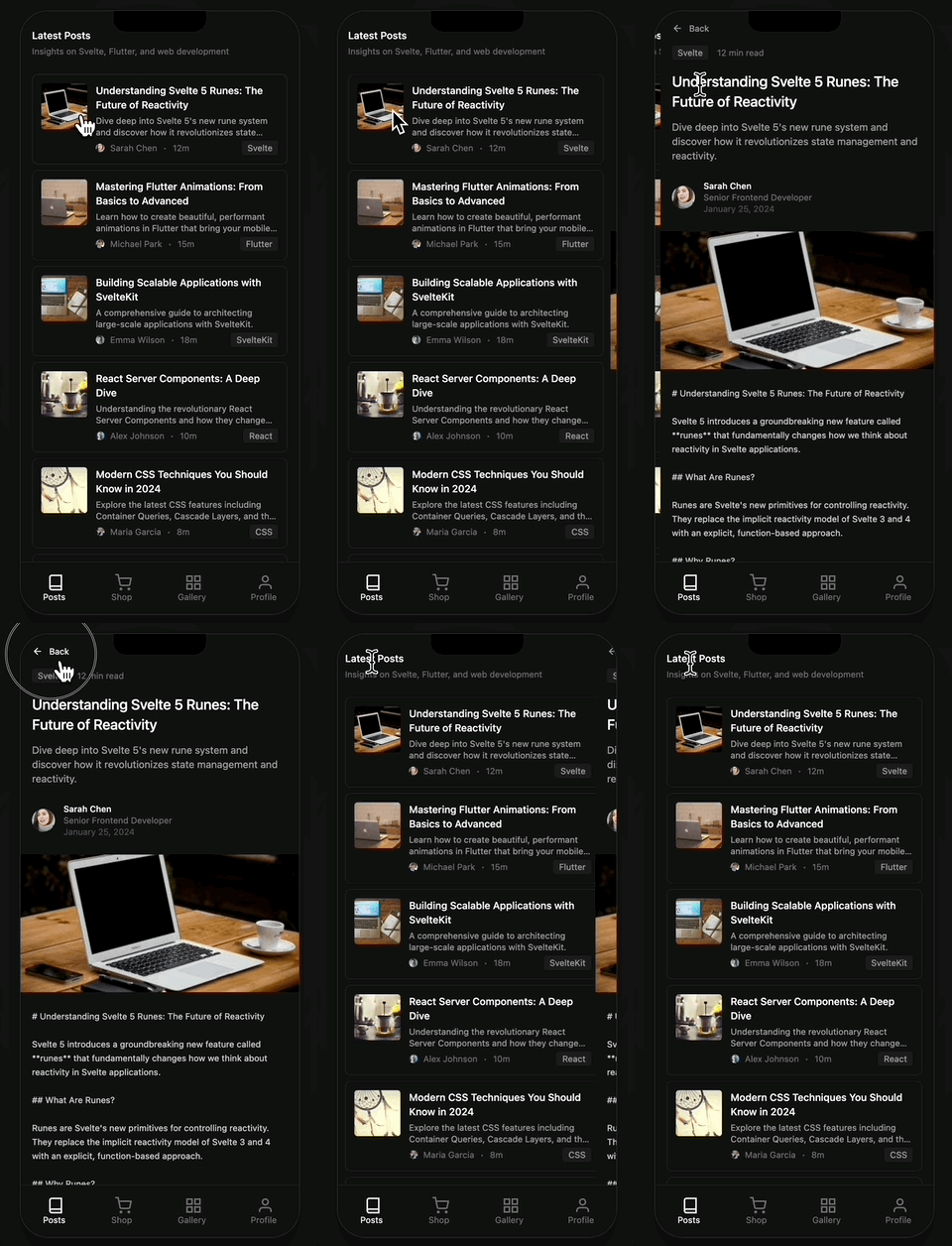
import { drill } from "@ssgoi/react/view-transitions";

drill({ direction: "enter" });  // entering
drill({ direction: "exit" });   // exiting
Pinterest Transition
Image expands into the detail view.
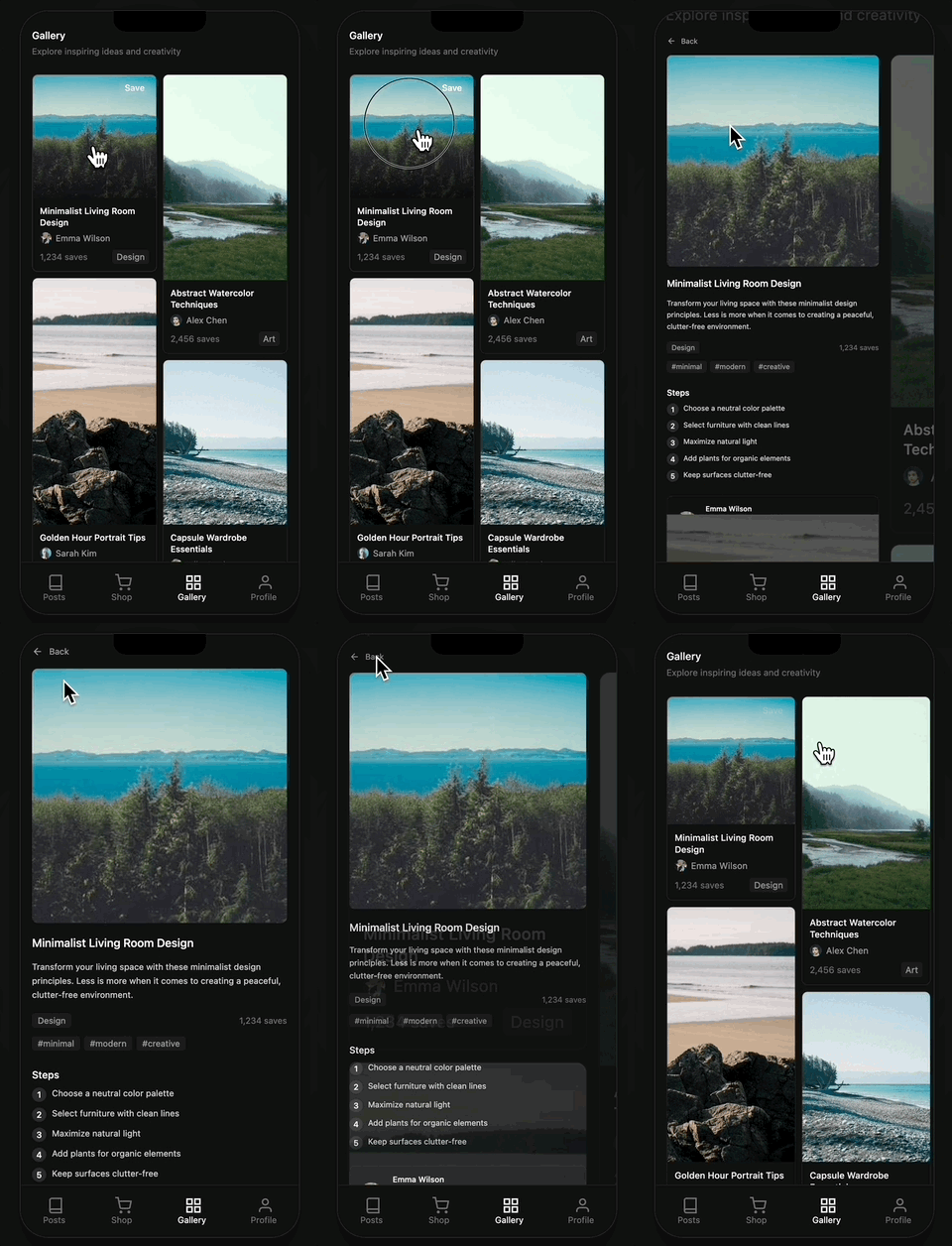
import { pinterest } from "@ssgoi/react/view-transitions";

// data attributes required!
<img data-pinterest-gallery-key={item.id} />  // gallery
<img data-pinterest-detail-key={item.id} />   // detail
Instagram Transition
Grid to detail, gallery stays visible.
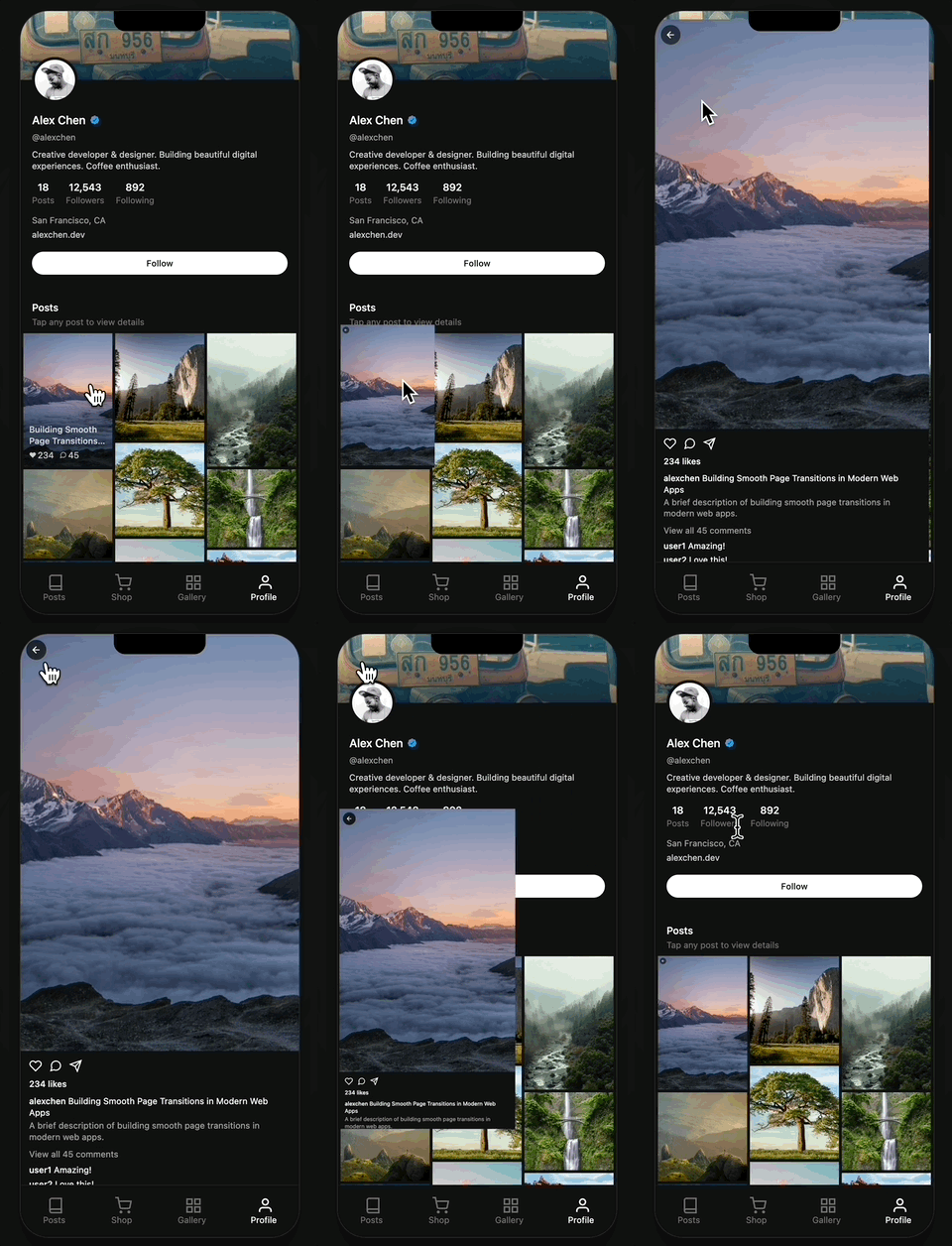
import { instagram } from "@ssgoi/react/view-transitions";

<img data-instagram-gallery-key={post.id} />  // grid
<img data-instagram-detail-key={post.id} />   // detail
Slide Transition
Left/right slide for tab switching.

import { slide } from "@ssgoi/react/view-transitions";

slide({ direction: "left" });
slide({ direction: "right" });
Conclusion
Using Tanstack Router with SSGOI gives you both type-safe routing and native-like transitions.
Key Takeaways
- Layout files required: Create a layout file with
<Outlet />for each section - Scroll restoration: Use
useEffect+requestAnimationFrameretry pattern - Nested Ssgoi: Use separate Ssgoi config in parent layout for tab UIs
Resources
- GitHub: https://github.com/meursyphus/ssgoi
- Documentation: https://ssgoi.dev
- Tanstack Router Template: https://github.com/meursyphus/ssgoi/tree/main/templates/tanstack-router