Keeping overlays continuous in shared element transitions
How SSGOI keeps badges, captions, and player controls from popping when a shared image moves between pages.
A video shrinks back into its thumbnail. The image follows the right path, its crop matches, and its corners settle into the card. Then, on the last frame, the duration badge and bottom navigation suddenly appear over it.
The image arrived correctly. The interface around it did not.
This was the next problem to solve in SSGOI's Zoom and Hero transitions. The fix gives the UI painted over a shared image its own temporary layer and ties its visibility to the image's motion. Badges disappear as a card opens; player controls arrive as the detail page settles. Returning to the list reverses that relationship.
Here, chrome means the interface around the content: captions, badges, gradients, navigation bars, and controls. The term describes these UI elements throughout this article.
Why overlays popped at the end
Zoom scales and clips an entire detail page around a shared image. That moving page, or tile, sits above the list during the transition. A badge that normally paints above the thumbnail is still inside the list, so the tile can cover it until the animation removes its temporary styles.
The player has the opposite problem. Its controls belong to the detail page, so they travel inside the tile. Without a separate fade, a large play button can shrink all the way into a tiny thumbnail and disappear only at cleanup.
Hero had a related issue on the return journey. Its temporary flight layer carries the images above both pages, covering the destination's photo counter or floating header buttons until it goes away.
Increasing the badge's z-index is not enough when it remains inside a lower stacking context. SSGOI needs an overlay above the moving visual, while preserving the real page's layout and stacking rules.
A temporary layer above the moving image
SSGOI now finds the list UI painted over the shared image and copies it into a temporary layer above the tile. The real badge and navigation stay in their original positions. The copies cover the moving tile where those elements need to remain visible.
Chrome copies             Badge, caption, overlapping navigation
Shared image copy         When crop differences require one
Moving tile               Detail page, scaled and clipped
Background page           Original list and its real chrome
For Zoom's expand and blur types, the background page also moves. The chrome layer uses that page's transform and transform origin, so a copied badge stays attached to the card underneath it throughout the move. A static background needs only the opacity animation.
Hero uses the same layer builder on exit, placing the destination's chrome above its flight layer. The two presets share the copying and clipping behavior even though they move different parts of the page.
The copies are visual stand-ins: they have aria-hidden, inert, and pointer-events: none. They cannot become extra buttons or duplicate focus targets. When the transition disposes, the temporary layer is removed.
Finding the UI that actually covers the image
A rectangle overlap alone cannot tell whether a badge paints above an image. It might be behind it, clipped away, or part of the moving page itself.
The chrome collector samples points inside the visible image box with document.elementsFromPoint(). The browser returns elements from top to bottom at each viewport coordinate. SSGOI keeps elements from the background page encountered above the shared image, excluding its ancestors and transition-generated layers.
A small grid covers the image, and extra samples at overlapping sibling elements help find narrow badges that fall between grid points. If both a caption wrapper and its children are found, only the outermost subtree is copied.
Decorative gradients often use pointer-events: none, which would hide them from this sampling. During the synchronous collection step, SSGOI temporarily makes the page hit-testable, then removes that override in a finally block.
This is a bounded DOM sampling strategy. It does not reproduce every possible CSS painting arrangement, and subtrees containing media such as video, canvas, or iframes are excluded from chrome cloning. The target is ordinary DOM overlays around the shared visual.
Let each page bring its controls in near arrival
Putting the copies in the right layer fixes their stacking, but fading them across the entire transition creates another distraction. Halfway through an expansion, a thumbnail caption can become enormous. A translucent player gradient can also expose the moving tile's edge against the same image beneath it.
SSGOI therefore shows a page's overlays only during the last 40% of the motion toward that page. For an opening transition, the card's chrome leaves in the first 40%; the player's controls enter in the final 40%.
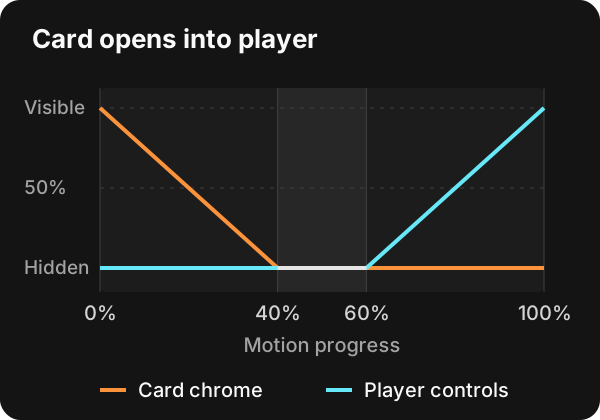
The opacity function is small:
const CHROME_SPAN = 0.4;

function chromeOpacity(toward: number) {
  const opacity = (toward - (1 - CHROME_SPAN)) / CHROME_SPAN;
  return Math.max(0, Math.min(1, opacity));
}
toward is progress toward the page that owns the overlay. During entry, the player's controls use forward progress and the list's chrome uses reverse progress. On exit, their roles swap. Clamping keeps opacity valid when the spring overshoots.
The percentages describe motion progress, not a fixed fraction of elapsed time. The fade follows the same physics as the rest of the transition. There is no timeout that can drift away from the image.
Zoom's default variant applies this fade to detail-page content overlapping the shared visual. Content below the player stays visible through the tile's own window. The fade variant still fades the rest of the page content as well. Each element fades toward its authored opacity, and cleanup restores inline styles only while that animation still owns the element.
Making the copies match at the handoff
A copy can follow the right path and still reveal itself when it disappears. Several details mattered before the landing frame matched the settled page.
Scroll coordinates. The layer's position is measured in the scroll container's content space. Adding the container's scroll offset again moved every copy down by the scrolled distance. The regression fixture now includes a list scrolled by 500 pixels and compares the copies with their originals at the start, middle, and end.
Rounded clipping. A caption inside a rounded overflow: hidden card is clipped by that card. Moving its clone to another layer loses that relationship. SSGOI rebuilds clipping ancestors as nested boxes around the copy, carrying their padding boxes, corner radii, and clip paths. A square badge can then stay correctly trimmed by a rounded card.
Inherited text styles. Copying a parent's computed style turns a unitless line-height into a fixed pixel value. Smaller descendants can inherit the wrong height and shift at the handoff. Each copied element now keeps its own resolved line height. Inherited text fill, stroke, and emphasis colors also return to currentcolor where appropriate, so a dark title inside a light-text wrapper keeps its own color.
These are small differences individually. At the moment a temporary layer disappears, they become a visible jump unless the copy and original agree.
When the thumbnail shows more of the picture
The same work exposed a geometry issue: a wide thumbnail can show image content that a narrower player crops away. Stretching the entire player page into the thumbnail's box would distort the image.
Zoom keeps a uniform scale and clips the tile to the portion of the image it can represent. The destination card stays visible underneath to supply the extra sides. A preview copy above the tile covers the whole card near the handoff, avoiding a seam where separately painted versions of the image meet. Chrome sits one layer higher, so the badge still paints above both.
Corner rounding continues throughout the move. Once the tile is inside the card, its rounded corners reveal the matching card beneath it. The image can preserve its proportions and still land on the card's shape.
The earlier article on shared element crops and object-fit explains the content geometry behind this distinction.
What the browser tests check
The browser fixture uses a card with a badge, an overlapping navigation bar, and a detail image with a player control. It seeks the actual Web Animations keyframes and checks rendered pixels and element positions.
The focused suite passed 26 tests across Chromium and WebKit for this article. It covers both directions of all three Zoom types, Hero's exit layer, scrolled lists, different image crops, both content variants, and temporary-layer cleanup.
The most useful comparison is the landing frame against the frame after cleanup. By the time the temporary tile disappears, the badge and navigation must already be in the right place, the player control must be gone, and the rounded corner must already show the correct background. Cleanup should leave the same picture on screen.
Try it in SSGOI
The chrome handling is part of the presets. Existing Zoom configurations and shared-image keys continue to work:
import { zoom } from "@ssgoi/react/view-transitions";

const transitions = [
  {
    from: "/videos",
    to: "/watch/*",
    transition: zoom({ type: "expand" }),
  },
];
Keep matching data-zoom-exit-key and data-zoom-enter-key values on the thumbnail and player visual. Badges, captions, and controls keep their ordinary markup; the preset builds the temporary chrome layer internally.
Open a video and return to its thumbnail in the YouTube Mobile showcase. Watch the controls around the image: the card's badge leaves early, the player controls arrive late, and the reverse journey restores the list before the moving layer disappears.